
Cast a Magnet Controls, Perfect Throws and Luck Gates
Last updated:
Control each stage of a cast: charge your throw, steer through underwater Luck gates, then reel the hooked treasure toward collection.
Equip a magnet and stand inside Fishing Spot. On desktop, hold and release the left mouse button to cast, steer with A/D, then rapidly click or press Space to reel. On mobile, use Cast, the arrow buttons and Reel. Release in the Perfect zone for 3.00× casting Luck; Golden Throw gives ×2 Luck and can occur on the same cast. Choose reachable gates by comparing their results using your current Luck.
Casting Requirements
Equip a magnet, then stand inside the Fishing Spot at the end of your base's dock. Use BASE to return to your base and walk onto the marked casting area.
Each attempt follows the same sequence: charge and release, steer during the descent, hook a treasure at maximum depth, then reel it in. If you still need your first magnet, follow the beginner guide to claim and equip Rusty Magnet.
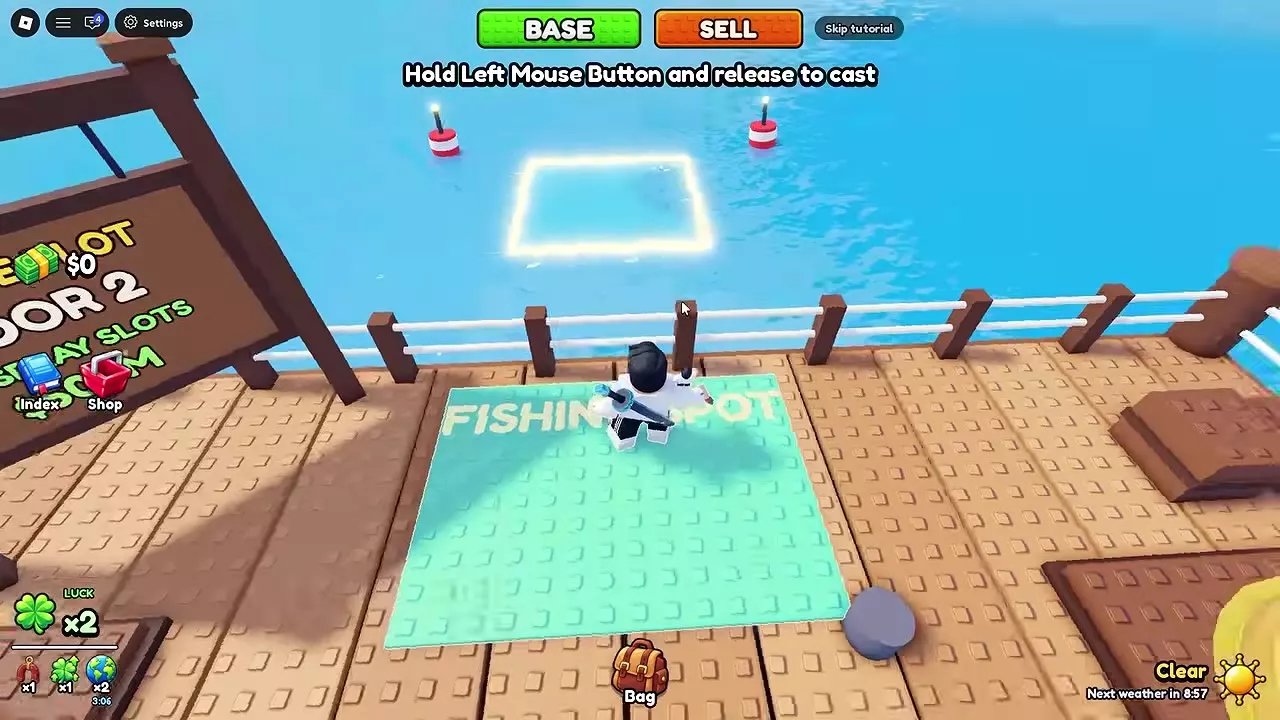
Desktop and Mobile Controls
| Action | Desktop | Mobile |
|---|---|---|
| Charge | Hold left mouse button | Hold Cast |
| Throw | Release left mouse button | Release Cast |
| Steer left | A | Left arrow |
| Steer right | D | Right arrow |
| Reel | Rapid clicks or Space presses | Rapid Reel taps |
On desktop, approach a stall's interaction prompt and press E. At MAGNETS, this opens View Magnets; at UPGRADES, it opens View Upgrades; at the selling counter, it opens Sell Treasure.
The top BASE and SELL buttons teleport you to your base and the selling area.
Perfect Throws
A Perfect throw gives 3.00× casting Luck before the underwater gates change your Luck.
- Hold the left mouse button on desktop, or hold Cast on mobile, to charge the throw.
- Watch the charge meter and release in its Perfect section.
- Look for PERFECT and 3.00× LUCK to confirm the result.
- Steer through beneficial gates as the magnet descends.
Use the meter's Perfect zone to time the release instead of releasing as soon as charging begins.


Golden Throw
Follow the Golden Throw countdown and keep casting until the indicated bonus throw. For example, in 4 casts · ×2 Luck means four further casts until the bonus.
When it activates, GOLDEN THROW and ×2 LUCK appear. Time that throw for Perfect as well: the same cast can receive both Golden Throw's ×2 Luck and Perfect's 3.00× casting Luck.
After the bonus activates, continue choosing gates and reeling as normal.


Choose Luck Gates
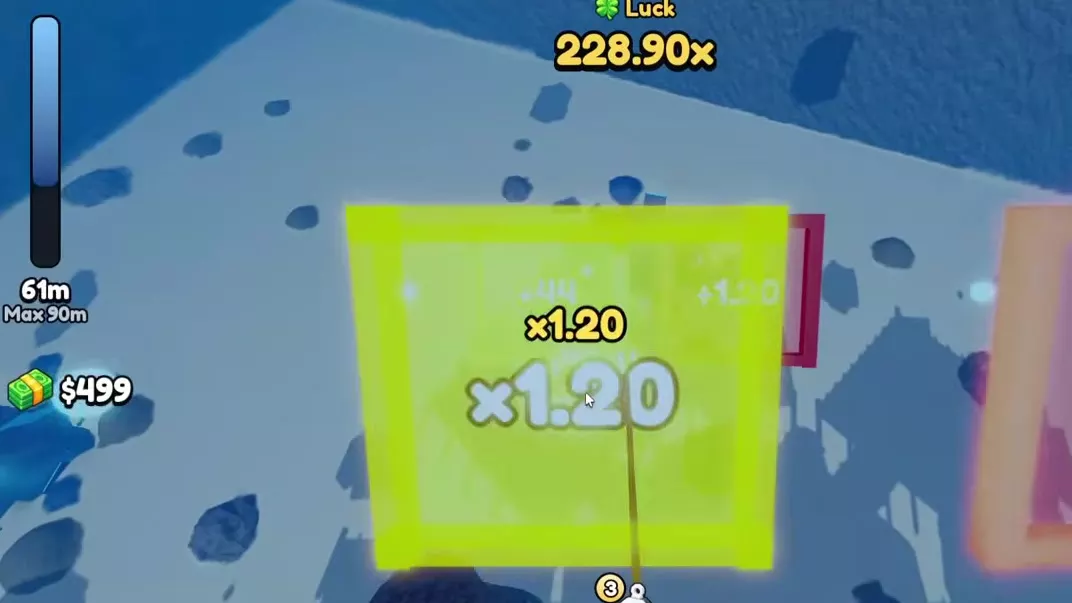
Use A/D or the mobile arrow buttons to line up with a gate during the descent. Compare the gates you can reach using your current underwater Luck, then steer toward the result that gives more Luck.
Read the operator
Let L be your current Luck reading. For addition and subtraction, a is the gate's displayed amount; m is a multiplier and d is a divisor.
| Gate | Color | Result |
|---|---|---|
| +a | Green | L + a |
| ×m | Yellow | L × m |
| −a | Red | L − a |
| ÷d | Red | L ÷ d |
Read the actual label before committing to a route. Avoid red subtraction and division gates when your route allows it. MISS marks a gate you did not pass through, so its operation is not applied. Steering around a harmful gate can produce MISS; continue toward the next beneficial gate.
Compare addition with multiplication
For +a versus ×m, compare the multiplier's gain, L × (m − 1), with a:
- Choose multiplication for the larger immediate result when L × (m − 1) > a.
- Choose addition when L × (m − 1) < a.
- Both give the same immediate result when the values are equal.
Multiplication becomes more valuable as your current Luck increases. Recalculate after each gate, and choose a reachable route instead of chasing a larger label you cannot line up with.
Four gates from 108.75× Luck
With 108.75× Luck entering this sequence, each gate uses the result of the previous one:
| Gate | Luck afterward |
|---|---|
| +3.60 | 112.35× |
| +15.00 | 127.35× |
| ×1.25 | 159.19× displayed |
| +15.00 | 174.19× displayed |
The ×1.25 gate acts on 127.35×, after both additions. The last +15.00 is added after that multiplication.
Keep the gate order
A route beginning at 330.00× follows this multiplication chain before its final addition:
| Gate | Luck afterward |
|---|---|
| ×1.10 | 363.00× |
| ×1.50 | 544.50× |
| ×1.35 | 735.08× displayed |
| +83 | 818.08× displayed |
A route beginning at 720.00× mixes addition and multiplication:
| Gate | Luck afterward |
|---|---|
| +36 | 756.00× |
| ×1.20 | 907.20× |
| +60 | 967.20× |
The +36 benefits from the later ×1.20 gate; the final +60 does not. Preserve the actual order when comparing routes. Increasing starting Luck does not multiply the fixed additions collected later.
Reeling and Cast Results
At maximum depth, FINAL LUCK displays the ending Luck for that dive. When SOMETHING HOOKED appears, read the treasure's Weight, the Magnet value and the difficulty label.
- Rapidly click or press Space on desktop. On mobile, rapidly tap Reel when Tap REEL fast! appears.
- Move the marker toward Treasure on the left and away from Lost on the right.
- Keep reeling when It's pulling back! appears; the treasure is pulling against your progress.
- Pull the treasure in to complete the catch and reveal the item.
Heavy treasures put more pressure on your equipment. Magnet Strength addresses lifting capacity, while Reel Power increases heavy-treasure reeling speed. If the result says TOO HEAVY or IT GOT AWAY, use the weight, difficulty and result message to diagnose the failure in the heavy-treasure guide.


Depth, Luck and Heavy Catches
Rope Length increases maximum diving depth and access to stronger gates. Compare gate rows as well as depth: upgrading from Level 3 to Level 4 costs 750 Cash, increases depth from 70 m to 90 m, and adds a fifth gate row. More rows give you more opportunities to change Luck during the descent.
Use the upgrade directory and progression tables to compare Rope Length with Luck and Reel Power. To improve the Luck you bring into each cast, see starting Luck and boost combinations. Higher Luck improves rare-find chances; collecting a heavy find still depends on your lifting capacity and reeling.